%20scale(1)'%3e%3cpath%20d='M42%2024%20L78%2024%20L98%208%20L104%2042%20L104%2070%20Q104%2094%2080%2094%20L46%2094%20L20%20112%20L26%2090%20Q16%2084%2016%2068%20L16%2042%20L22%208%20Z'%20fill='%2315293D'%20stroke='%2315293D'%20stroke-width='8'%20stroke-linejoin='round'/%3e%3ccircle%20cx='43'%20cy='55'%20r='17'%20fill='%23FFFFFF'/%3e%3ccircle%20cx='77'%20cy='55'%20r='17'%20fill='%23FFFFFF'/%3e%3ccircle%20cx='45'%20cy='56'%20r='11'%20fill='%23F4A62A'/%3e%3ccircle%20cx='75'%20cy='56'%20r='11'%20fill='%23F4A62A'/%3e%3ccircle%20cx='46'%20cy='56'%20r='5.5'%20fill='%2315293D'/%3e%3ccircle%20cx='74'%20cy='56'%20r='5.5'%20fill='%2315293D'/%3e%3cpath%20d='M54%2072%20L66%2072%20L60%2082%20Z'%20fill='%23F4A62A'%20stroke='%23F4A62A'%20stroke-width='3'%20stroke-linejoin='round'/%3e%3c/g%3e%3cg%20transform='translate(156%20107.3)'%3e%3cpath%20d='M22.30%200L6.20%200L6.20-72L22.30-72L22.30-55.50Q22.30-53.50%2022.15-51.35Q22-49.20%2021.65-46.95Q21.30-44.70%2020.95-42.40Q20.60-40.10%2020.10-37.90L22.50-37.90Q23.90-42.80%2026-46.45Q28.10-50.10%2031.50-52.15Q34.90-54.20%2040.20-54.20Q49.60-54.20%2054.25-47.65Q58.90-41.10%2058.90-27.50L58.90%200L42.70%200L42.70-24.80Q42.70-32.90%2040.35-36.95Q38-41%2033.20-41Q29.50-41%2027.10-38.70Q24.70-36.40%2023.50-32.55Q22.30-28.70%2022.30-24M91.30%201.40Q83.30%201.40%2077.15-1.70Q71-4.80%2067.50-11Q64-17.20%2064-26.50Q64-35.80%2067.50-41.95Q71-48.10%2077.20-51.15Q83.40-54.20%2091.40-54.20Q99.40-54.20%20105.60-51.10Q111.80-48%20115.30-41.85Q118.80-35.70%20118.80-26.40Q118.80-16.90%20115.20-10.70Q111.60-4.50%20105.35-1.55Q99.10%201.40%2091.30%201.40M91.80-10.30Q95.40-10.30%2097.80-11.95Q100.20-13.60%20101.40-17Q102.60-20.40%20102.60-25.40Q102.60-30.70%20101.30-34.35Q100-38%2097.45-39.95Q94.90-41.90%2090.90-41.90Q87.50-41.90%2085.05-40.25Q82.60-38.60%2081.40-35.20Q80.20-31.80%2080.20-26.70Q80.20-18.50%2083.25-14.40Q86.30-10.30%2091.80-10.30M149%201.40Q141%201.40%20134.85-1.70Q128.70-4.80%20125.20-11Q121.70-17.20%20121.70-26.50Q121.70-35.80%20125.20-41.95Q128.70-48.10%20134.90-51.15Q141.10-54.20%20149.10-54.20Q157.10-54.20%20163.30-51.10Q169.50-48%20173-41.85Q176.50-35.70%20176.50-26.40Q176.50-16.90%20172.90-10.70Q169.30-4.50%20163.05-1.55Q156.80%201.40%20149%201.40M149.50-10.30Q153.10-10.30%20155.50-11.95Q157.90-13.60%20159.10-17Q160.30-20.40%20160.30-25.40Q160.30-30.70%20159-34.35Q157.70-38%20155.15-39.95Q152.60-41.90%20148.60-41.90Q145.20-41.90%20142.75-40.25Q140.30-38.60%20139.10-35.20Q137.90-31.80%20137.90-26.70Q137.90-18.50%20140.95-14.40Q144-10.30%20149.50-10.30M203%201.30Q193.70%201.30%20189.30-3.65Q184.90-8.60%20184.90-19.50L184.90-40.20L177.40-40.20L177.70-52.70L183.10-52.70Q186.30-52.80%20187.95-53.70Q189.60-54.60%20190-57.10L191.30-64.50L200.40-64.50L200.40-52.80L213.10-52.80L213.10-39.70L200.40-39.70L200.40-20.20Q200.40-16.80%20202.05-15.20Q203.70-13.60%20207.10-13.60Q209-13.60%20210.70-14Q212.40-14.40%20213.50-15.10L213.50-0.20Q210.30%200.80%20207.65%201.05Q205%201.30%20203%201.30'%20fill='%2315293D'/%3e%3cpath%20d='M247.30%200L220.20%200L220.20-66L244.20-66Q256.50-66%20264.30-62.10Q272.10-58.20%20275.70-50.95Q279.30-43.70%20279.30-33.60Q279.30-25.80%20277.45-20.10Q275.60-14.40%20272.40-10.55Q269.20-6.70%20265.05-4.35Q260.90-2%20256.35-1Q251.80%200%20247.30%200M244.80-53L236.30-53L236.30-13L246.80-13Q252-13%20255.50-15.20Q259-17.40%20260.75-21.80Q262.50-26.20%20262.50-32.80Q262.50-38.10%20261.40-41.90Q260.30-45.70%20258.15-48.15Q256-50.60%20252.65-51.80Q249.30-53%20244.80-53M302.20%200L287.20%200L287.20-66L311.30-66L328.50-18.50L329-18.50L345.80-66L368.80-66L368.80%200L353.60%200L354.50-49.60L353.40-49.60L334.30%200L321.10%200L302.40-49.60L301.30-49.60'%20fill='%23C97F0A'/%3e%3c/g%3e%3c/svg%3e)
The LinkedIn outreach metrics that actually matter (and how to track them)
The HootDM team · 6 min read
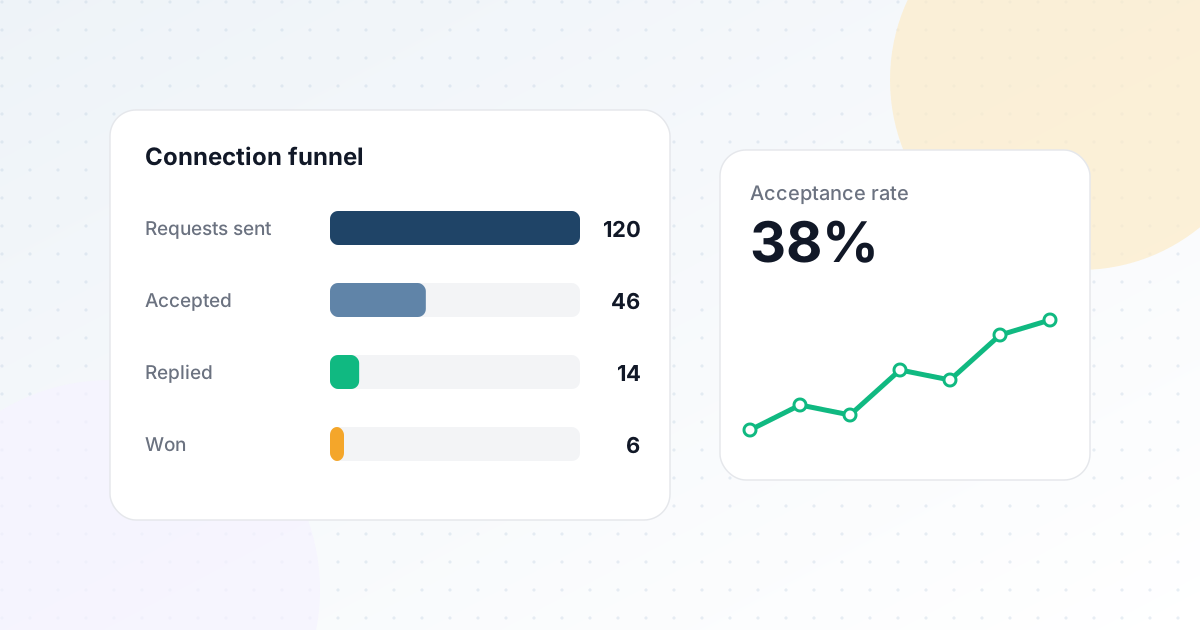
"How many replies did we get this month" is the question most people ask about outreach performance, and it's the least useful one to start with. A single number at the end of the funnel tells you whether things went well, but nothing about why — and without the why, you can't actually improve anything. Here's the funnel view that does.
The four numbers that actually explain performance
- Sent — total connection requests sent in the period. Your baseline.
- Connected — how many were accepted. A low connect rate points to targeting, not your messaging.
- Messaged — how many connected leads received an initial message. This should track closely with Connected; a gap here usually means messages aren't being sent promptly after acceptance.
- Won — how many messaged leads replied. This is where message quality, personalization, and follow-up timing show up most clearly.
Looking at these as a funnel, rather than in isolation, tells you exactly where a campaign is leaking — and a campaign converting poorly because acceptances are low needs a completely different fix than one where connections are fine but messages go unanswered.
What a weak stage in each part of the funnel usually means
Low Sent → Connected
If a low percentage of your connection requests get accepted, the problem is almost always upstream of messaging — usually the targeting is off (wrong titles, wrong seniority, wrong industry) rather than anything about the request itself.
Low Connected → Messaged
This gap should be small. If it isn't, it's usually an operational issue — messages not firing promptly after acceptance — rather than anything about your audience or copy.
Low Messaged → Won
This is where message quality, template variants, personalization, and follow-up cadence live. If connections are healthy but replies aren't coming, the problem is almost always in what you're actually saying once someone's connected, not in who you're reaching.
Don't ignore the trend, not just the total
A monthly total can hide a real problem that a day-by-day view would catch early — a sudden multi-day drop in accepted connections, for instance, might mean a LinkedIn account issue, a paused campaign, or a targeting change that only shows up as "a disappointing month" if you're not watching it as it happens. Checking activity trends over a rolling 15 or 30 day window catches problems while there's still time to fix the current campaign, not just learn from the last one.
Tracking this without manually checking LinkedIn
None of this is useful if the underlying data is stale — a funnel built from a snapshot you happened to check last week isn't telling you what's actually happening now. HootDM's connection funnel and daily activity dashboard are built on data synced automatically from your real LinkedIn connections and conversations, so the numbers reflect reality rather than whenever you last remembered to look. See how on the Analytics dashboard feature page.