%20scale(1)'%3e%3cpath%20d='M42%2024%20L78%2024%20L98%208%20L104%2042%20L104%2070%20Q104%2094%2080%2094%20L46%2094%20L20%20112%20L26%2090%20Q16%2084%2016%2068%20L16%2042%20L22%208%20Z'%20fill='%2315293D'%20stroke='%2315293D'%20stroke-width='8'%20stroke-linejoin='round'/%3e%3ccircle%20cx='43'%20cy='55'%20r='17'%20fill='%23FFFFFF'/%3e%3ccircle%20cx='77'%20cy='55'%20r='17'%20fill='%23FFFFFF'/%3e%3ccircle%20cx='45'%20cy='56'%20r='11'%20fill='%23F4A62A'/%3e%3ccircle%20cx='75'%20cy='56'%20r='11'%20fill='%23F4A62A'/%3e%3ccircle%20cx='46'%20cy='56'%20r='5.5'%20fill='%2315293D'/%3e%3ccircle%20cx='74'%20cy='56'%20r='5.5'%20fill='%2315293D'/%3e%3cpath%20d='M54%2072%20L66%2072%20L60%2082%20Z'%20fill='%23F4A62A'%20stroke='%23F4A62A'%20stroke-width='3'%20stroke-linejoin='round'/%3e%3c/g%3e%3cg%20transform='translate(156%20107.3)'%3e%3cpath%20d='M22.30%200L6.20%200L6.20-72L22.30-72L22.30-55.50Q22.30-53.50%2022.15-51.35Q22-49.20%2021.65-46.95Q21.30-44.70%2020.95-42.40Q20.60-40.10%2020.10-37.90L22.50-37.90Q23.90-42.80%2026-46.45Q28.10-50.10%2031.50-52.15Q34.90-54.20%2040.20-54.20Q49.60-54.20%2054.25-47.65Q58.90-41.10%2058.90-27.50L58.90%200L42.70%200L42.70-24.80Q42.70-32.90%2040.35-36.95Q38-41%2033.20-41Q29.50-41%2027.10-38.70Q24.70-36.40%2023.50-32.55Q22.30-28.70%2022.30-24M91.30%201.40Q83.30%201.40%2077.15-1.70Q71-4.80%2067.50-11Q64-17.20%2064-26.50Q64-35.80%2067.50-41.95Q71-48.10%2077.20-51.15Q83.40-54.20%2091.40-54.20Q99.40-54.20%20105.60-51.10Q111.80-48%20115.30-41.85Q118.80-35.70%20118.80-26.40Q118.80-16.90%20115.20-10.70Q111.60-4.50%20105.35-1.55Q99.10%201.40%2091.30%201.40M91.80-10.30Q95.40-10.30%2097.80-11.95Q100.20-13.60%20101.40-17Q102.60-20.40%20102.60-25.40Q102.60-30.70%20101.30-34.35Q100-38%2097.45-39.95Q94.90-41.90%2090.90-41.90Q87.50-41.90%2085.05-40.25Q82.60-38.60%2081.40-35.20Q80.20-31.80%2080.20-26.70Q80.20-18.50%2083.25-14.40Q86.30-10.30%2091.80-10.30M149%201.40Q141%201.40%20134.85-1.70Q128.70-4.80%20125.20-11Q121.70-17.20%20121.70-26.50Q121.70-35.80%20125.20-41.95Q128.70-48.10%20134.90-51.15Q141.10-54.20%20149.10-54.20Q157.10-54.20%20163.30-51.10Q169.50-48%20173-41.85Q176.50-35.70%20176.50-26.40Q176.50-16.90%20172.90-10.70Q169.30-4.50%20163.05-1.55Q156.80%201.40%20149%201.40M149.50-10.30Q153.10-10.30%20155.50-11.95Q157.90-13.60%20159.10-17Q160.30-20.40%20160.30-25.40Q160.30-30.70%20159-34.35Q157.70-38%20155.15-39.95Q152.60-41.90%20148.60-41.90Q145.20-41.90%20142.75-40.25Q140.30-38.60%20139.10-35.20Q137.90-31.80%20137.90-26.70Q137.90-18.50%20140.95-14.40Q144-10.30%20149.50-10.30M203%201.30Q193.70%201.30%20189.30-3.65Q184.90-8.60%20184.90-19.50L184.90-40.20L177.40-40.20L177.70-52.70L183.10-52.70Q186.30-52.80%20187.95-53.70Q189.60-54.60%20190-57.10L191.30-64.50L200.40-64.50L200.40-52.80L213.10-52.80L213.10-39.70L200.40-39.70L200.40-20.20Q200.40-16.80%20202.05-15.20Q203.70-13.60%20207.10-13.60Q209-13.60%20210.70-14Q212.40-14.40%20213.50-15.10L213.50-0.20Q210.30%200.80%20207.65%201.05Q205%201.30%20203%201.30'%20fill='%2315293D'/%3e%3cpath%20d='M247.30%200L220.20%200L220.20-66L244.20-66Q256.50-66%20264.30-62.10Q272.10-58.20%20275.70-50.95Q279.30-43.70%20279.30-33.60Q279.30-25.80%20277.45-20.10Q275.60-14.40%20272.40-10.55Q269.20-6.70%20265.05-4.35Q260.90-2%20256.35-1Q251.80%200%20247.30%200M244.80-53L236.30-53L236.30-13L246.80-13Q252-13%20255.50-15.20Q259-17.40%20260.75-21.80Q262.50-26.20%20262.50-32.80Q262.50-38.10%20261.40-41.90Q260.30-45.70%20258.15-48.15Q256-50.60%20252.65-51.80Q249.30-53%20244.80-53M302.20%200L287.20%200L287.20-66L311.30-66L328.50-18.50L329-18.50L345.80-66L368.80-66L368.80%200L353.60%200L354.50-49.60L353.40-49.60L334.30%200L321.10%200L302.40-49.60L301.30-49.60'%20fill='%23C97F0A'/%3e%3c/g%3e%3c/svg%3e)
The LinkedIn outreach tool that runs itself — safely.
HootDM automates connection requests, follow-ups, and reply detection through LinkedIn’s own session — with pacing, jitter, and daily caps built in so your account stays in good standing while you sleep.
No credit card required · Cancel anytime
Ananya Rao
Head of Growth · Finlytics
Daniel Brooks
VP Sales · Northwind
Priya Menon
Founder · Kitebase
Marcus Lee
RevOps Lead · Cloudmint
Today’s activity
Next action in 74s· randomized
Built for
Outbound-driven people, not sales-ops departments
Solo SDRs & BDRs
Run a full outbound motion without a sales-ops team backing you up.
B2B SaaS founders
Keep doing your own outbound without it eating your whole week.
Lead-gen agencies
Run outreach for clients on one clean, predictable pricing model.
Recruiters & coaches
Reach candidates or clients directly, on your own terms.
How it works
From a search to a reply, without babysitting
Set your steps once — HootDM paces every action against real LinkedIn limits and updates lead status automatically.
01 · Source leads
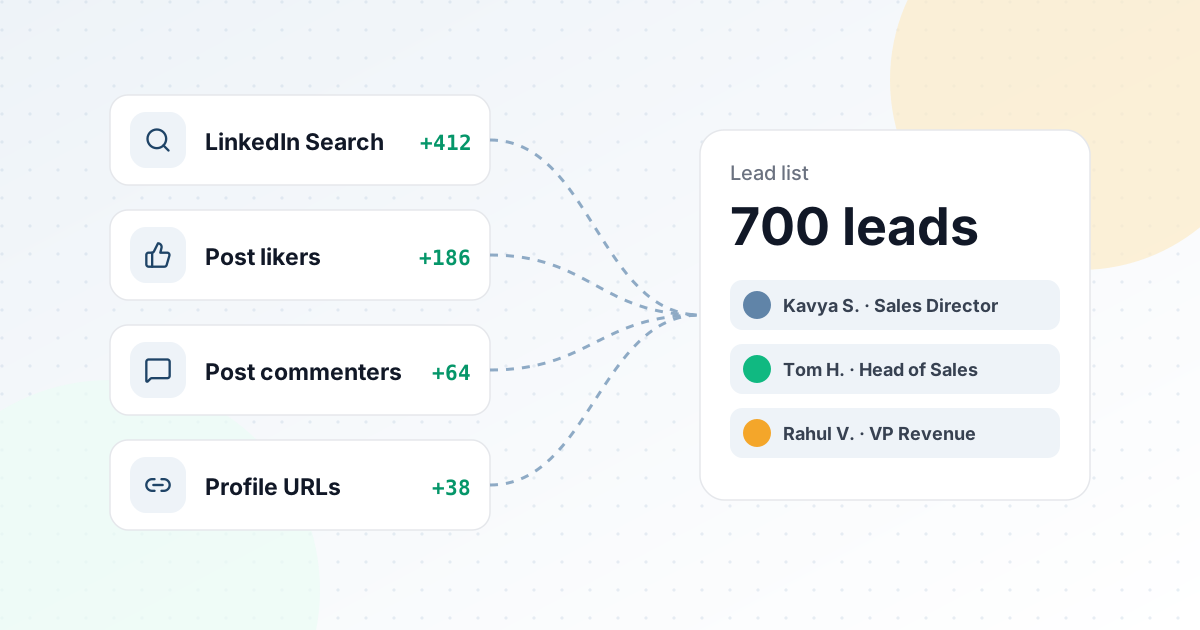
Four ways in, one clean list
Search LinkedIn by title, keywords and location, pull everyone who liked or commented on a post, or paste profile URLs. Each source builds a lead list that is ready to run.
Explore lead sourcingBuilding the list
LinkedIn Search
VP Sales · Bengaluru
Post likers
“Outbound in 2026” post
Post commenters
Same post
Profile URLs
Pasted list
Lead list · VP Sales outreach
700
Everything you need
Outreach, sourcing, and safety in one place
Four ways to source leads
LinkedIn search filters, post likers, post commenters, or a pasted list of profile URLs — build a list in minutes.
Smart, predefined sequences
A proven step order — warm-up like, connect, message, follow-ups — with automatic accept & reply detection.
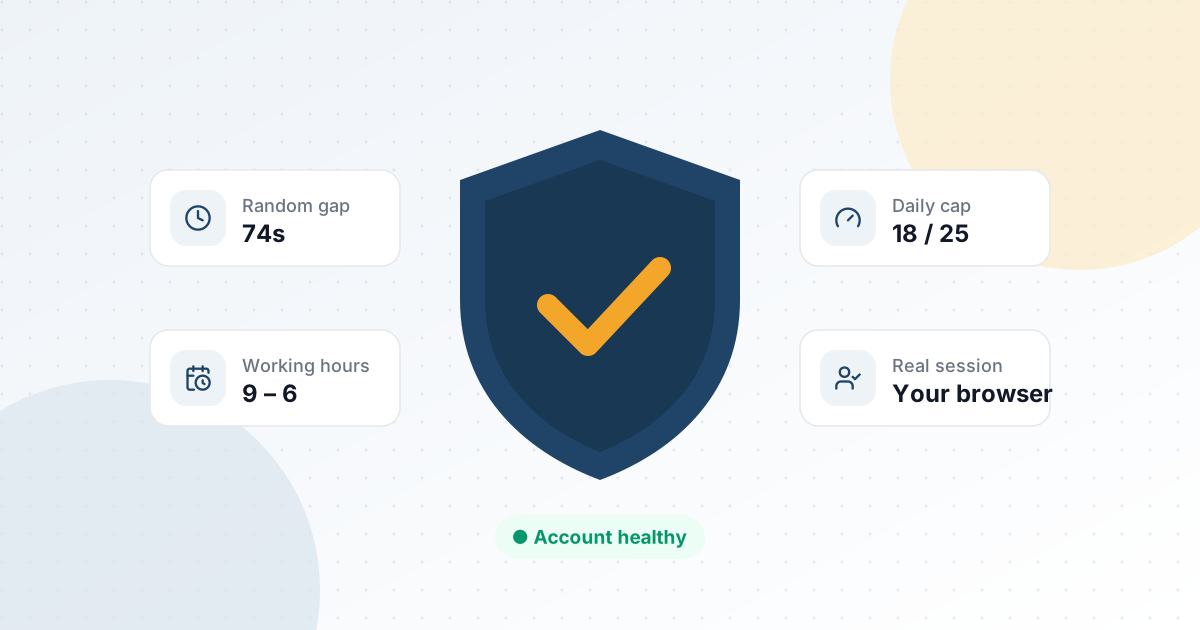
Safety-first pacing
Randomized jitter, adaptive per-type gaps, and daily caps — tuned to look and feel human, not scripted.
Message variants
Add multiple templates per step and let HootDM rotate them at random — no two prospects get the exact same line.
Synced connections & reply detection
Your real LinkedIn connections list stays in sync, and replies are detected automatically — no manual re-checking.
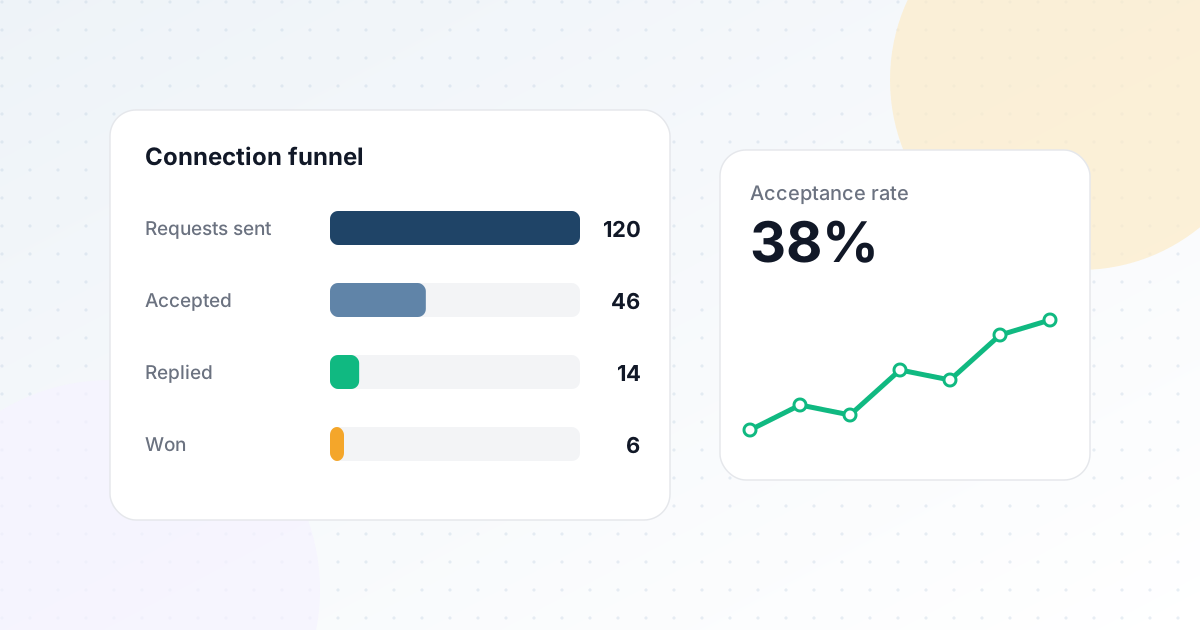
Clear analytics
Connection funnel and daily activity, so you always know what's working and where leads are dropping off.
Why it’s different
Built to protect your account, not just hit a number
Most outreach tools optimize for volume. HootDM optimizes for a LinkedIn account that’s still standing in six months — because a restricted account is worth zero pipeline.
- Runs through your real session — the extension relays actions through your own logged-in browser, not a headless bot.
- Adaptive daily caps spread your quota evenly across the day instead of firing in bursts.
- Randomized jitter on every gap and delay so activity never lands on a suspiciously exact interval.
- One active campaign at a time per account, by design — no stacking sequences that spike your activity.
Today’s pacing
Try before you commit
See your leads before you commit
Your 7-day free trial isn’t a demo video — it’s the real product. Build an actual lead list from LinkedIn search, post engagement, or profile URLs before you ever enter a card number.
FAQ
Common questions
Is this safe for my LinkedIn account?
HootDM runs through your own logged-in session via a lightweight Chrome extension, and paces every action with adaptive gaps, randomized delays, and daily caps — the same safeguards described above.
Do I need to keep Chrome open for it to run?
Yes — HootDM runs through your own browser session rather than a separate cloud browser, so Chrome needs to be open with LinkedIn logged in. It’s a deliberate trade-off: no isolated cloud session to manage, but the extension needs your browser running to act.
Do I need to install anything complicated?
Just the HootDM Chrome extension and a normal LinkedIn login — no separate browser profile or proxy setup required.
What happens if a lead doesn't accept my connection request?
HootDM keeps checking automatically, and marks the lead as closed after your configured timeout — so your list always reflects reality, not guesswork.
Can I write my own message templates?
Yes — build unlimited templates per step, and add multiple variants per step that HootDM rotates automatically.
From the blog